GBS Control (GBS-C) HDMI Converter Tackles PS2 Interlace Jitters Cheaply
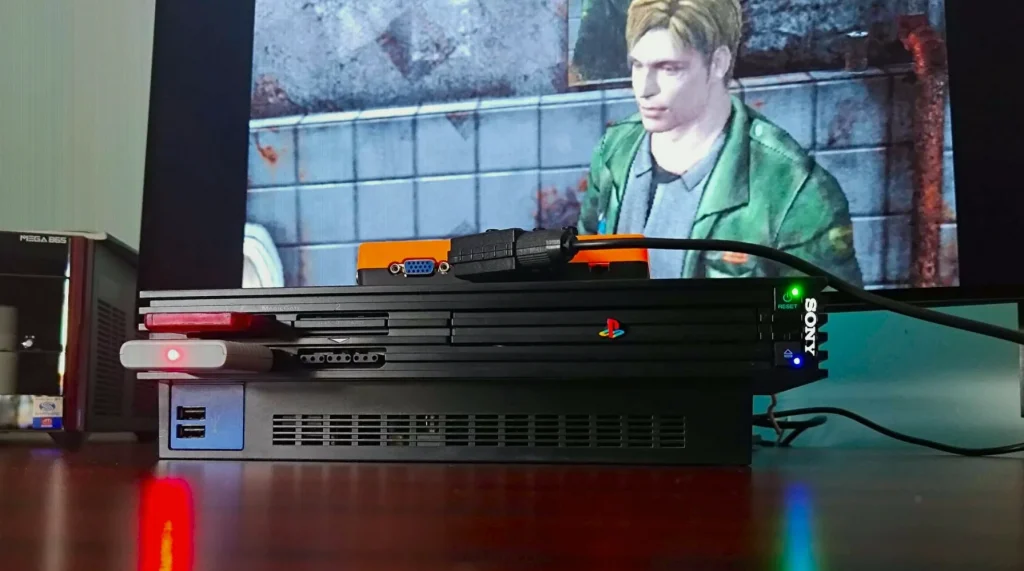
PS2 players trying to modernize their setup often run into a specific problem: the console’s largely interlaced graphics can look jittery on today’s monitors, especially after deinterlacing turns masked interlacing artifacts into obvious frame-to-frame “bobbing.” A new open-source HDMI converter, the GBS Control (GBS-C), is being positioned as a fix specifically aimed at motion-adaptive deinterlacing for PS2, while still offering upscaling features for a broader range of retro inputs.
Why PS2 looks jittery on modern displays
The issue comes from how interlaced video works. Interlacing splits a frame into odd and even fields, showing them rapidly to form what appears to be a full image. On CRTs, the flicker can be less noticeable because phosphors fade gradually and interact with the display’s shadow mask/aperture grille behavior, along with pixel bleeding. On modern screens, converting interlaced signals into solid frames can make the jitter much easier to see.
Standard “bob” deinterlacing is a common culprit. It rebuilds a full frame by using even horizontal pixels to fill odd lines and vice versa, which introduces a pixel-position shift every frame. For PS2 content at 60Hz, that pixel switching happens 60 times per second, producing the bobbing flicker that’s especially obvious on text and background textures.
What motion-adaptive deinterlacing changes
Motion-adaptive deinterlacing is designed to combine two approaches. It detects whether pixels are changing: when there’s no movement, it avoids bobbing-style pixel shifts by using weave behavior, and when movement is present, it applies bob algorithms to reduce motion artifacts. The goal is to remove jitter in static areas while keeping fast motion looking clean and smooth.
GBS-C’s “PS2 superpower”
The GBS Control (GBS-C) is an open-source HDMI converter originally started as a DIY kit. In this PS2-focused use case, the key claim is that it can apply motion-adaptive techniques to interlaced signals—something the writer contrasts with an OSSC setup where the deinterlacing approach doesn’t fully fix the flickery symptoms.
The practical result described is that scenes with static detail can look steadier, while motion remains smoother. The difference is illustrated with examples including Silent Hill 2, where the jitter is said to show up mainly on background elements like brick wall textures and static objects, and to calm down when the character is moving—then becomes easier to spot when motion-adaptive interlacing is applied.
Core features and setup requirements for the GBS-C
- It’s an open-source HDMI converter meant to connect retro consoles to modern TVs or monitors.
- It supports motion-adaptive upscaling as a highlighted feature for interlaced PS2 signals.
- Up to 1080p resolution presets are available.
- Picture controls are offered through an on-device interface and a more expansive Wi-Fi menu.
- A “dev mode” is included for additional advanced configuration.
For the Wi-Fi menu, the setup described requires using the GBS-C as a hotspot and then pointing it at the home internet connection. Once configured, the motion adaptive option and the other tuning controls become accessible.
Where the GBS-C falls short versus line-doubling
Even with motion-adaptive deinterlacing, the writer says the GBS-C doesn’t deliver the same sharpness “visual punch” as an OSSC-style line doubler. The reason given is that line doubling produces sharper results than what’s described as the softer scaling behavior used by the GBS-C (referred to as Bilinear Scaling).
The author’s plan is to experiment with using both an OSSC and the GBS-C together, aiming to combine sharp line-doubled rendering with motion-adaptive handling of interlaced signals.
Budget alternatives: OSSC Pro and RetroTINK options
Because buying two upscalers isn’t portrayed as cost-effective, the writer suggests that if you want both sharp line doubling and motion-adaptive deinterlacing in a single purchase, the OSSC Pro is worth considering as the higher-priced option.
For enthusiast-grade results, the writer points to RetroTINK-5X Pro and RetroTINK-4K. These are described as using FPGA chips to deliver zero-lag performance and very sharp visuals compared to the GBS-C’s motion adaptive upscaling. The stated price range for those two models is between $300 and $750, which is framed as out of reach for many retro players.
Cable and signal compatibility: don’t miss the RGB requirement
The GBS-C setup described comes with an important limitation: it deals with RGB signals through SCART, component, or VGA. As a result, players with consoles that only output composite (example given: an NES) will need the appropriate cables or a composite-to-RGB conversion solution.