ICY BOX Heart Dock 2300 Review: 11-in-1 USB-C Dock with 160W Power and LCD
The ICY BOX Heart Dock 2300 (model IB-DK2300-CH) is a stationary USB-C dock built to replace multiple desk accessories at once. It combines a traditional docking hub with an integrated network power supply, supports charging a laptop over USB-C up to 100W, drives two HDMI displays, adds Gigabit Ethernet, and includes a color LCD screen that shows connection status and real-time power draw.
What the ICY BOX Heart Dock 2300 is
Heart Dock 2300 is designed for users who run their main workflow from a laptop. With a single USB-C connection to the host PC, it provides access to monitors, wired networking, fast external storage, and common peripherals like mice and keyboards. The dock also includes additional USB-C Power Delivery ports aimed at charging phones, tablets, and other mobile devices, while using built-in AC power to reduce the number of separate “power bricks” on your desk.
Its most distinctive feature is a color TFT LCD screen (2.01 inches, 296 x 240). Instead of acting only as a passive indicator, it can display details such as monitor settings, port status, and the current power consumption reported for the charging ports.
Key specifications (ports, displays, power, networking)
- Host connection: USB-C 3.2 Gen 2 (up to 10 Gb/s)
- Laptop charging over USB-C (Power Delivery): up to 100W
- Total power budget: up to 160W (shared across the dock’s charging outputs)
- Video outputs: 2x HDMI 2.0
- Declared display support: up to 2x 4K at 60 Hz (host-dependent), or up to 4K at 120 Hz for a single display (maximum claim)
- Front data ports: 2x USB-C 3.2 Gen 2 (10 Gb/s) + 1x USB-A 3.2 Gen 2 (10 Gb/s)
- Additional rear USB: USB-A 2.0 (480 Mb/s)
- Charging ports: 2x USB-C Power Delivery (up to 100W per port, within the shared 160W budget) + 1x USB-A charging (up to 12W)
- Networking: RJ-45 Gigabit Ethernet (10/100/1000 Mb/s)
- Supported OS: Windows, macOS, ChromeOS, Linux
- Power: AC 230V
- Warranty: 24 months
- Dimensions/weight: 155 x 77 x 65 mm, 971 g
- Cable length (host): 100 cm
Box contents and built-in power
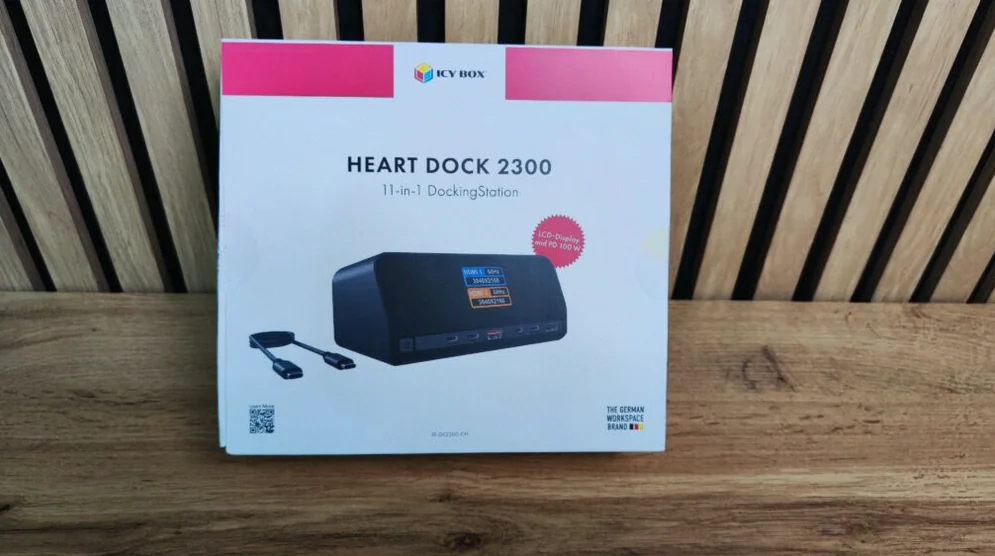
The dock ships in a large white package with pink accents. In the box you get the Heart Dock 2300, a 100 cm USB-C to USB-C cable, a power cable, a short user guide, and safety documentation.
Unlike many compact bus-powered hubs, the Heart Dock 2300 does not include a separate external power adapter. It has integrated power circuitry, and it connects to the wall using a standard mains cable with a plug that ends in a “clover” style connector.
Design: heavy, stable, and desk-friendly
At 971 grams, the Heart Dock 2300 is substantially heavier than typical portable USB-C hubs, making it more like a small desk component than something intended for constant travel. The company uses a two-tone build: an anthracite polycarbonate body with a matte top and a glossy, tinted front panel that covers the LCD and port markings.
The dock also includes two long rubber strips on the bottom to help it stay in place while plugging in cables and drives. The glossy front looks modern but can attract fingerprints and dust, so the protective film is intended to be removed after the dock is positioned in its final location.
Port layout: where everything is placed
The dock concentrates the most frequently used connections on the front:
- 2x USB-C (10 Gb/s)
- 1x USB-A (10 Gb/s)
- 2x USB-C Power Delivery charging ports
- 1x USB-A charging port
- a front button for powering and controlling the LCD screen
On the back, the dock provides the “permanent” connections:
- USB-C host port
- USB-A 2.0 (480 Mb/s)
- 2x HDMI
- Gigabit Ethernet (RJ-45)
- mains power input
There’s also a single button on the left side of the front. A short press switches the LCD views, while a longer press turns the dock on or off. The ability to fully power down is meant to stop power delivery to the connected ports after work ends.
LCD screen: more than a visual extra
The 2.01-inch TFT LCD is used to show information that is usually hidden on standard docks. It can indicate:
- USB device connection and disconnection events
- current power draw through the charging ports
- HDMI output status
- resolution and refresh rate of the attached monitor(s)
- signal absence
- standby mode
Power readouts are positioned as particularly useful: users can confirm whether a laptop, phone, or tablet has started fast charging and see how much power is being requested at that moment. The screen is also described as helping diagnose monitor problems—for example, detecting “no signal” when the cable is connected but the host settings or compatibility are the real issue.
Power Delivery: up to 100W to the laptop, within a 160W total budget
Heart Dock 2300 can charge a laptop through the host USB-C cable with up to 100W (Power Delivery). The dock also has two USB-C Power Delivery ports on the front for mobile devices. However, the dock’s overall power budget is capped at up to 160W, and that total is shared dynamically across the laptop and the other charging outputs.
The screen is meant to reflect that split in real time. An additional USB-A charging port supports up to 12W, intended for lower-power accessories like older phones, headsets, controllers, or power banks.
To hit the 100W laptop charging target, the laptop must support USB-C charging, and the USB-C cable used must support the required power levels.
Video and multi-monitor support: two HDMI ports, host-dependent results
The dock includes two HDMI 2.0 outputs. The manufacturer states support for either two 4K displays at 60 Hz or a single 4K display at up to 120 Hz, but the actual outcome depends on the host’s USB-C video capabilities.
In practical terms, the laptop’s USB-C port must support DisplayPort Alt Mode for video. The dock also depends on the host’s DisplayPort version and features such as MST and DSC, plus the HDMI cables and monitors used.
For Windows, the company provides compatibility scenarios that depend on DisplayPort version, DSC availability, and MST support. For macOS, it notes use of SST (not MST) and indicates 4K behavior at 30 Hz or 60 Hz depending on the DisplayPort 1.2 vs 1.4 situation.
It also makes an important clarification: two physical HDMI ports do not automatically guarantee two independent extended desktops on macOS. The dock avoids DisplayLink-style software workarounds, so macOS multi-monitor results depend on the specific Mac model and its hardware limits.
Networking: Gigabit Ethernet only
The dock offers RJ-45 Gigabit Ethernet (10/100/1000 Mb/s), with no 2.5 GbE option. Gigabit is positioned as sufficient for typical home and office uses such as video calls, VPN work, file transfer from NAS devices, and general internet access. The lack of 2.5 GbE matters primarily for users running faster-than-1 GbE networks.
USB data: fast ports, but shared bandwidth
The front includes three high-speed data ports rated at USB 3.2 Gen 2 (10 Gb/s): two USB-C and one USB-A. This is intended for fast external SSDs, NVMe enclosures, card readers, and similar devices.
However, the dock’s entire data pipeline to the computer runs over a single USB-C 10 Gb/s host connection, meaning bandwidth is shared across all dock functions (including the ports and other features). The dock is not marketed as USB4 or Thunderbolt, so it does not target 40 Gb/s-style expansion performance.
Compatibility checklist and setup expectations
Heart Dock 2300 supports Windows, macOS, ChromeOS, and Linux. In typical use, it should not require additional drivers. After connecting power and USB-C to the host, the system is expected to detect USB devices, the network adapter, and video outputs automatically.
For full functionality, the host USB-C port must support three capabilities:
- USB data transfer
- DisplayPort Alt Mode for video
- Power Delivery, if you want laptop charging through the dock
If a laptop’s USB-C port is limited to data only, users may still get USB peripherals and Ethernet, but HDMI video may not work and laptop charging may not start.
What’s missing (and what to consider before buying)
Despite being positioned as an 11-in-1 dock, the Heart Dock 2300 does not include several features some buyers may expect:
- no SD or microSD card readers
- no DisplayPort output (only HDMI video)
- no 3.5 mm audio jack
- no 2.5 GbE networking
- no USB4 or Thunderbolt support
- no Kensington-style security slot
The documentation’s “7-in-1” vs “11-in-1” wording is described as inconsistent, and the explanation around the highest 4K 120 Hz mode is not presented with enough precision alongside the compatibility matrix. The dock’s value will depend heavily on whether your laptop’s USB-C video implementation matches the scenarios required for dual 4K at 60 Hz.
Who it’s for
The Heart Dock 2300 is best suited for a fixed desk setup where a laptop connects to one or two monitors, wired Ethernet, a few fast storage/peripheral devices, and where users want the dock to handle charging and reduce the number of power adapters.
It is not presented as a good fit for travelers needing a light hub, users requiring Thunderbolt 4 or USB4-class bandwidth, or anyone who wants 2.5 GbE networking or built-in card reading.
Bottom line
ICY BOX Heart Dock 2300 aims to be a full-time desk solution: it pairs a multi-port USB-C dock with integrated power delivery (up to 160W shared, up to 100W to the laptop), dual HDMI video outputs, Gigabit Ethernet, and a color LCD screen that surfaces details most docks hide. At a listed price of around 400 złotych, it’s positioned as a compelling option for users who prioritize charging capacity, stable construction, and practical on-device diagnostics—while accepting that it does not include Thunderbolt/USB4, 2.5 GbE, or card readers.