Trust Vyran Vertical Ergonomic Mouse Review: Hyperscroll Wheel + USB-C
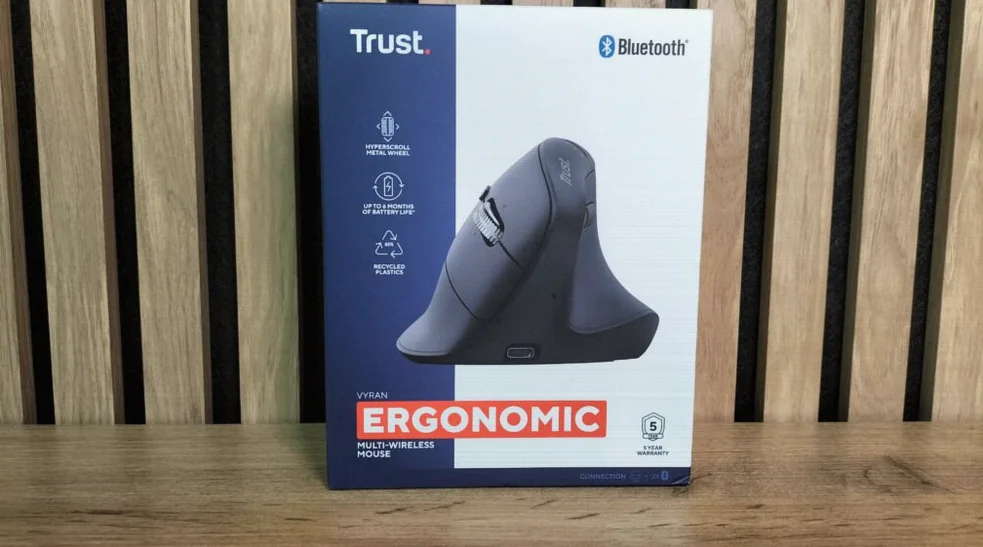
Trust has added a new option for people who spend hours navigating documents, spreadsheets, and web pages: the Trust Vyran vertical ergonomic mouse. It combines a 50-degree angled design with a metal Hyperscroll wheel, supports three simultaneous device connections, and includes USB-C charging—aimed squarely at office and multi-device setups rather than gaming.
Quick facts
- Model: Trust Vyran Ergonomic Multi-Wireless Hyperscroll Mouse (product 26107, EAN 8713439261073)
- Designed for right-handed users, vertical shape tilted at 50 degrees
- Wireless: USB-A 2.4 GHz receiver plus two Bluetooth profiles (up to 3 devices stored)
- Sensor resolution: adjustable 1000–4800 DPI (optical)
- Wheel: metal Hyperscroll with both vertical and horizontal scrolling (sideways via tilting the main wheel)
- Battery: built-in 500 mAh; manufacturer claims up to 6 months with average use
- Charging: USB-C, about 3.5 hours to recharge; usable while charging
- Warranty: 5 years
- Price mentioned: about 216–260 PLN in Poland; manufacturer lists 59.99 EUR
Ergonomic 50-degree tilt built for long document sessions
The Trust Vyran is a right-handed vertical mouse with a clear ergonomic intent: the 50-degree angle is meant to bring your hand closer to a more natural handshake-like position. That should reduce how much your forearm needs to rotate inward compared with a traditional flat mouse.
It also provides a wide base and a contoured thumb area so you can rest a larger portion of your hand on the device. The mouse is not “near-vertical” like some designs closer to 90 degrees, so switching may still take a few days—especially for precise, small movements.
Size and weight point strongly toward desk work rather than frequent carrying. At 116 × 84 × 75 mm and 132 g, the Vyran fills your palm and sits firmly on the desk, but it isn’t a compact travel mouse.
Metal Hyperscroll wheel with horizontal scrolling
The most distinctive feature is the metal Hyperscroll wheel. Its textured, ridged surface is designed for confident control, and it supports fast scrolling—useful when moving through long web pages, PDF documents, and large spreadsheets.
Horizontal scrolling is handled by tilting the main wheel left or right. In compatible apps, that lets you move across wide Excel sheets and timelines, or shift view on documents that extend beyond the window width.
Trust does not position the Vyran as a gaming mouse, and it does not provide typical gaming sensor specs such as polling rate, maximum acceleration, or tracking speed. What it does provide is a DPI button and a resolution range of 1000–4800 DPI, which should cover typical work on Full HD monitors and higher-resolution setups.
Quiet primary clicks, but no button remapping software
Trust specifies quiet left and right main clicks. However, it only guarantees quieter performance for those specific buttons; the click feel of the wheel and other controls may still be noticeable depending on the room and your usage.
In total, the manufacturer lists five primary buttons. There’s also a DPI switch, controls for left/right wheel tilt, and a dedicated connection-change button. The side buttons handle back and forward.
A key limitation for power users: the Vyran does not support programming or custom macro mapping. Trust also notes that it lacks advanced configuration software—so while the hardware buttons cover everyday navigation, it won’t match the flexibility you’d expect from higher-end productivity mice.
Two Bluetooth links plus 2.4 GHz, switching across three devices
The Vyran can store and switch between up to three devices. One connection uses the included USB-A 2.4 GHz receiver, while two additional profiles connect via Bluetooth. A connection button and LED indicators help you see which device is currently active.
Importantly, switching changes mouse control only. The mouse does not provide features like automatic cursor movement between computers, clipboard sharing, or file transfer between devices.
The receiver uses a USB-A plug. If your laptop only has USB-C, Trust includes a USB-A to USB-C adapter. The receiver and adapter together protrude more than a native USB-C dongle, but the bottom of the mouse includes a storage area to help keep the small module from getting lost.
USB-C charging and long battery life claims
Inside is a built-in 500 mAh battery (3.7 V, 1.85 Wh). Trust claims up to six months of use under average conditions, though actual runtime will depend on factors like usage hours, which connection type you use, and how often the mouse sleeps.
Charging takes about 3.5 hours. The USB-C port is located on the front, and the mouse can be used while charging. The included cable is USB-C to USB-C with a 90 cm length.
What you’re paying for—and what you’re giving up
The Trust Vyran is positioned as an office-first vertical mouse. Its 50-degree ergonomic tilt, thumb support, quiet main clicks, and metal Hyperscroll wheel make it a focused tool for people who spend most of their day in documents and spreadsheets.
It also brings practical multi-device value: two Bluetooth profiles plus a 2.4 GHz receiver, USB-C charging, the included USB-A to USB-C adapter, and a manufacturer-listed five-year warranty. Trust further states that 85% of the plastic used in the product comes from recycled sources.
The trade-offs are clear. It’s right-handed only, it’s relatively large and heavy (132 g), and it lacks button remapping, macro support, and automated multi-computer workflows. Trust also uses sideways wheel tilting for horizontal scrolling, which can be convenient, but it isn’t the same as a dedicated separate thumb wheel.
Pricing varies by region, with a manufacturer list price of 59.99 EUR and typical Poland pricing reported around 216–260 PLN. If you want vertical ergonomics without moving to the most expensive models—and you work across multiple devices—Vyran is designed to fit that niche.